Capterra and Software Advice
Get a demo Get a demo

Mass
Notification

Fast. Reliable. Built for moments that matter.

When communication is critical, our Mass Notification platform makes sure your message gets through – instantly, clearly, and everywhere it needs to.

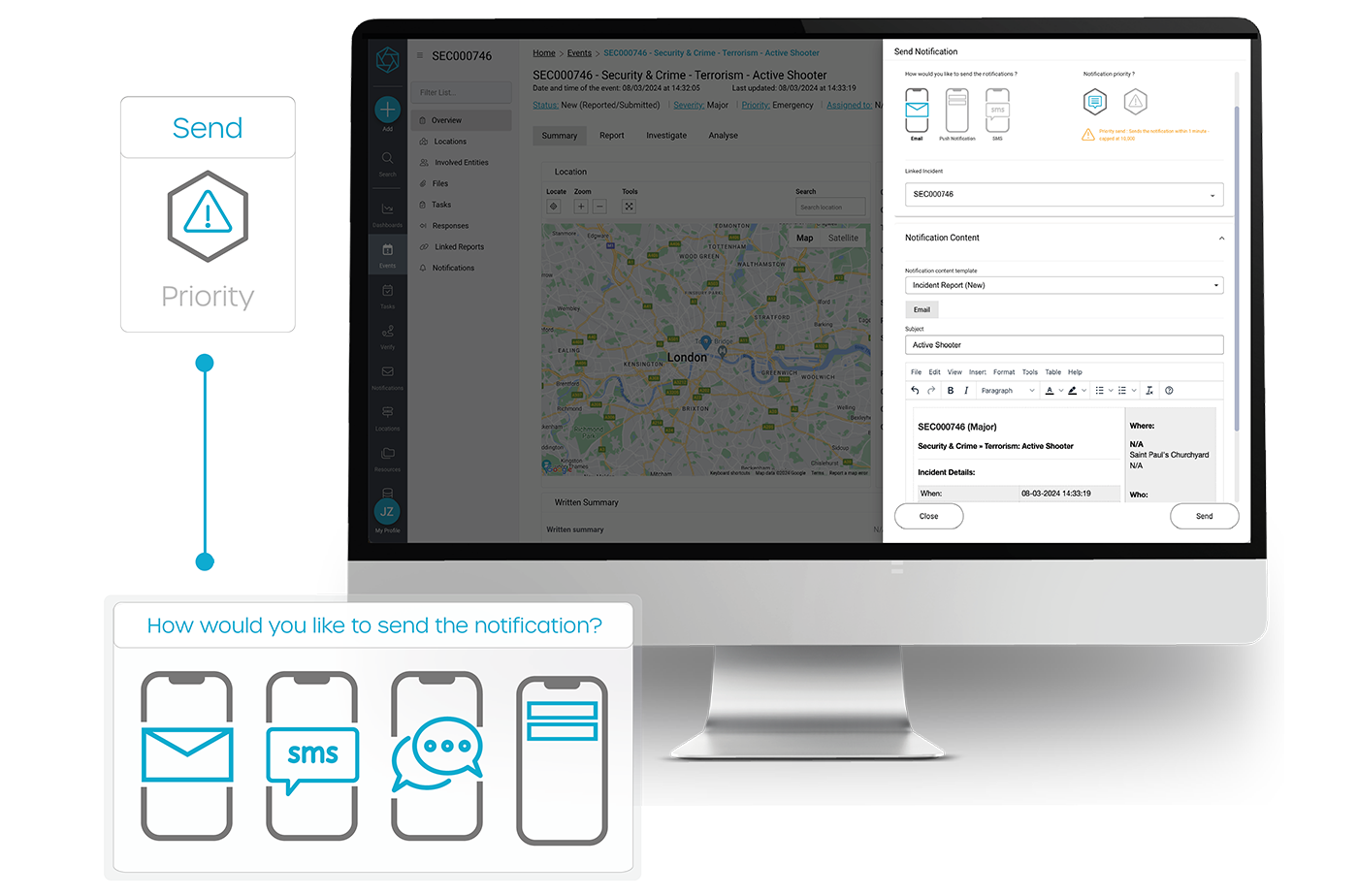
Send alerts across multiple channels. Reach the right people in real time. Keep teams connected, informed, and ready to act.

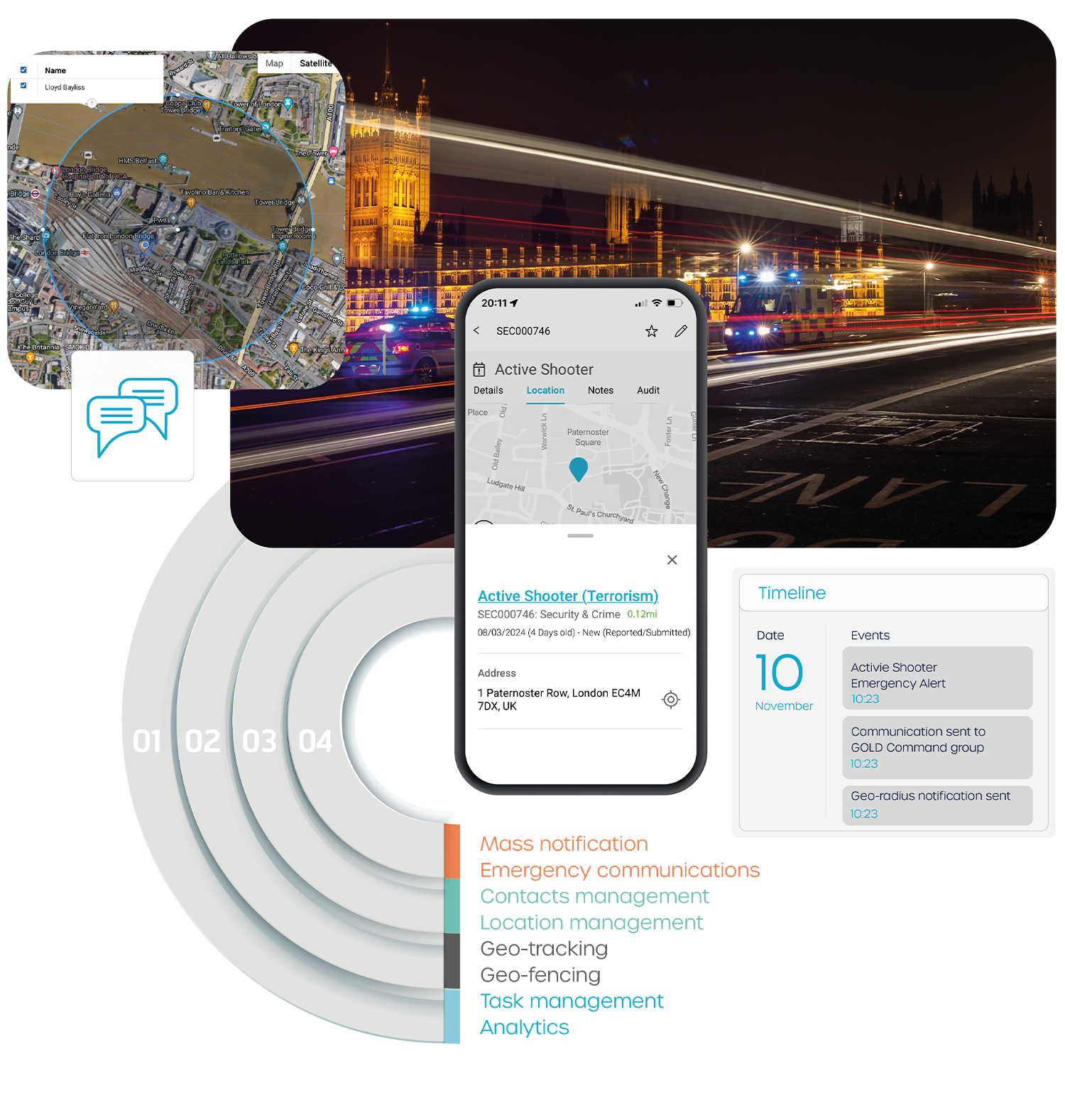
Geo-targeted mass notification alerts

Relied on by teams who need everyone informed, instantly.

The Crown Estate
Graff Diamonds
Amazon Studios
Knight Frank
JLL
22 Bishopsgate
NEXT
Kingfisher Group

Zinc Systems

Simple to use. Powerful under pressure.

Mass Notification

Alert faster
Deliver messages fast. Drive timely awareness and action.

Mass Notification

Proven reliability
Nothing missed. Seamless multi-channel delivery.

Mass Notification

Connected teams
Keep everyone connected. Real-time insights.

Mass Notification

Smart workflows
Intelligent automation. Less manual work.

Key mass notification features

loader-icon

Rapid, targeted emergency communication.

Instantly reach employees and stakeholders with critical updates, ensuring swift action and safety.

  • Target messages to specific groups or locations when critical events occur.
  • Use pre-configured message templates or custom texts enabling rapid communication.
  • Share media, maps, and documents instantly.
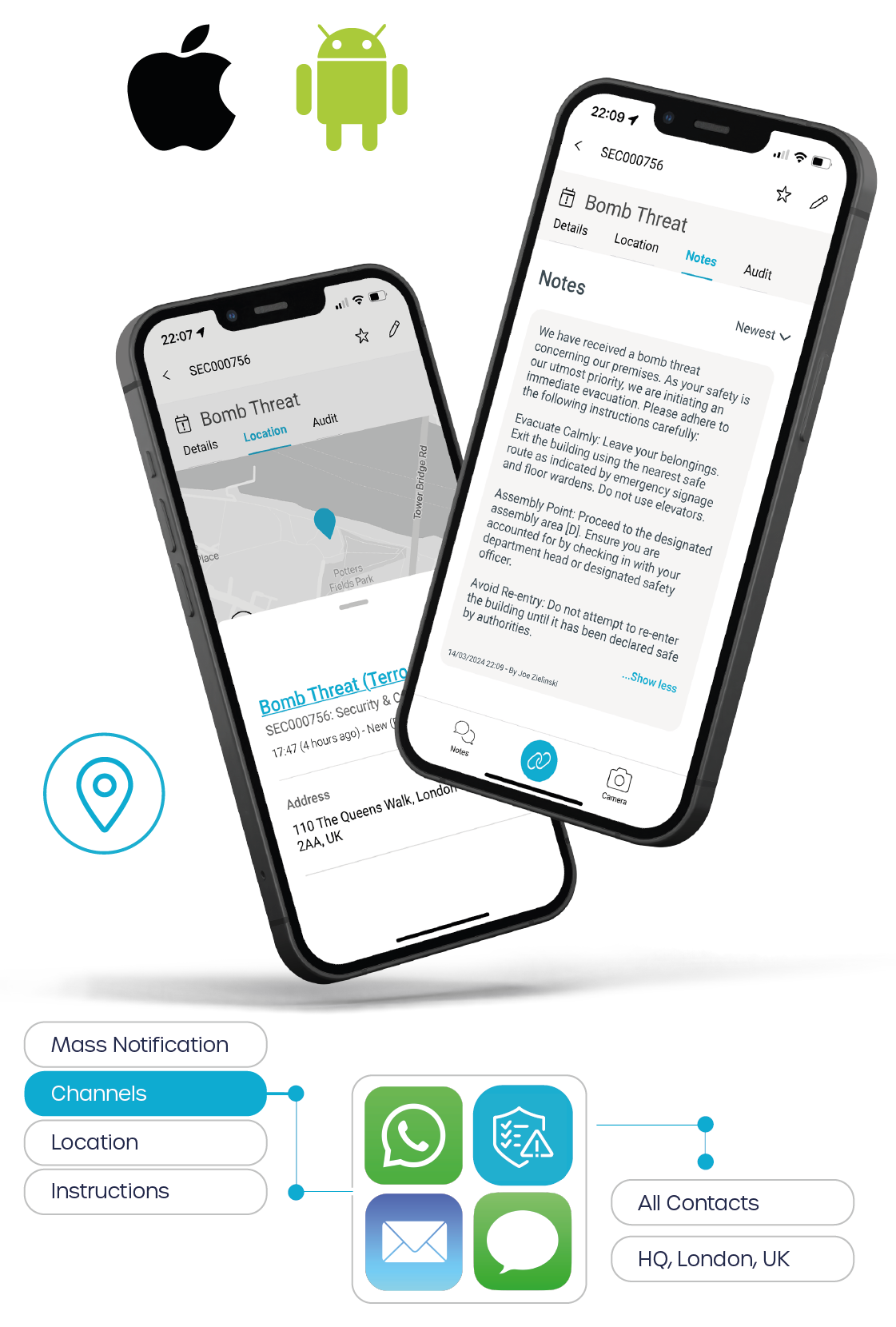
  • Send alerts and communications directly to our mobile App.
  • Deliver multi-channel messages via email, SMS, or WhatsApp.
  • Send geo-targeted radius alerts for critical incidents.
  • Track communication delivery and read receipts.
  • Maintain a full audit trail for accountability.

Respond fast, evacuate safely

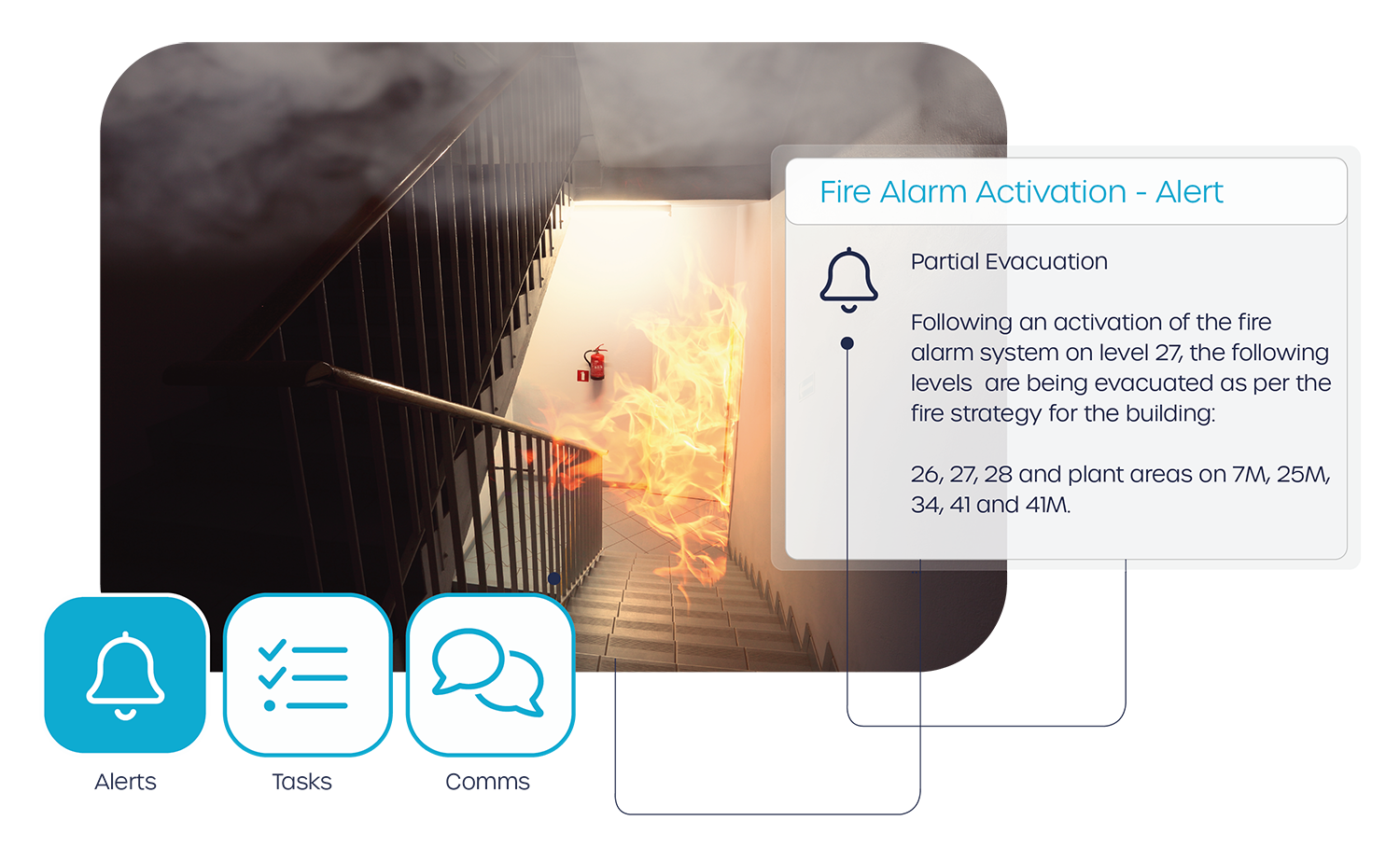
  • Take control of fire incidents with real-time alerts, guided actions, and full accountability.
  • Trigger instant alerts across email, voice, SMS, and in-app - for staff, occupiers, and visitors.
  • Manage phased, partial, or full evacuations with targeted messaging by zone or floor.
  • Notify adjacent areas when nearby floors are evacuating to maintain awareness.
  • Auto-launch fire procedures and building-specific response plans.
  • Track live status updates from fire marshals, including floor clearance and incident progress.
  • Send clear "evacuation complete" and "reoccupation" notifications in real time.
  • Log all actions with a full audit trail for compliance reporting.

Automated alerts, delivered instantly.

Keep your teams informed and your operations moving - without the lag.

  • Prevent delays with automated, workflow-driven communications.
  • Pre-defined communication channels based on urgency.
  • Instantly notify the right people as events unfold.
  • Launch messages quickly with pre-built templates.
  • Auto-escalate to senior leadership via email and in-app alerts.
  • Attach automated instructions, maps & documents in one click.
  • Automated update alerts triggered when key changes are made.
  • Maintain a full audit trail of who was alerted, when, and how.

Read More

Boost tenant engagement and elevate the experience.

Power seamless communications that inform, engage, and retain your occupiers.

  • Centralise all staff & occupier communications in one smart platform.
  • Deliver personalised messages to different types of communities.
  • Customise content by organisation, building, brand, audience, or event.
  • Share operational updates, news, and documents in real time.
  • Distribute internal staff briefings and daily updates with ease
  • Promote events, amenities, and initiatives with ease.
  • Integrate directly with tenant apps like Smart Spaces for a unified experience.
  • Support marketing efforts with branded campaigns and announcements.

Organise contacts, reach with precision

Centralised contact management that powers smarter, faster communication at scale.

  • Manage all contact records in one secure, central admin hub.
  • Connect via API to sync users from HR, access control, or tenant platforms.
  • Import and update contact lists instantly via CSV or system integration.
  • Segment users by role, location, building, or access level for targeted alerts.
  • Automate enrolment and contact syncing across your ecosystem via an integration.
  • Enable in-the-gateline communications for real-time messaging by integrating with access control.
  • Ensure data accuracy with permission-based access levels.
  • keep contact records up to date and audit-ready with built-in change tracking.

Zinc Systems
Zinc Systems

Effortless alerts. Maximum impact.

  • Real-time alerts
    Send instant updates with two-way communication, including images and attachments.
  • Easy alerting
    Easy-to-use interface for fast, reliable mass messaging in seconds.
  • Fully configurable
    Automate workflows with flexible personalised messaging templates.
  • Personnel safety
    Track responses, assign tasks, and monitor nearby threats – all in real time.

Fire alarm mass notification

Zinc Systems
Mass Nofification

Stay ahead. Stay connected.

  • Flexible contact grouping
    Choose from predefined groups like locations, organisations, or custom segments for precise, effective communication.
  • Communication consistency
    Keep communications consistent, add branding and auto-fill key details based on context.
  • Automated alerts
    Set triggers to instantly notify the right people when specific events occur—no manual action needed.
  • Traceability
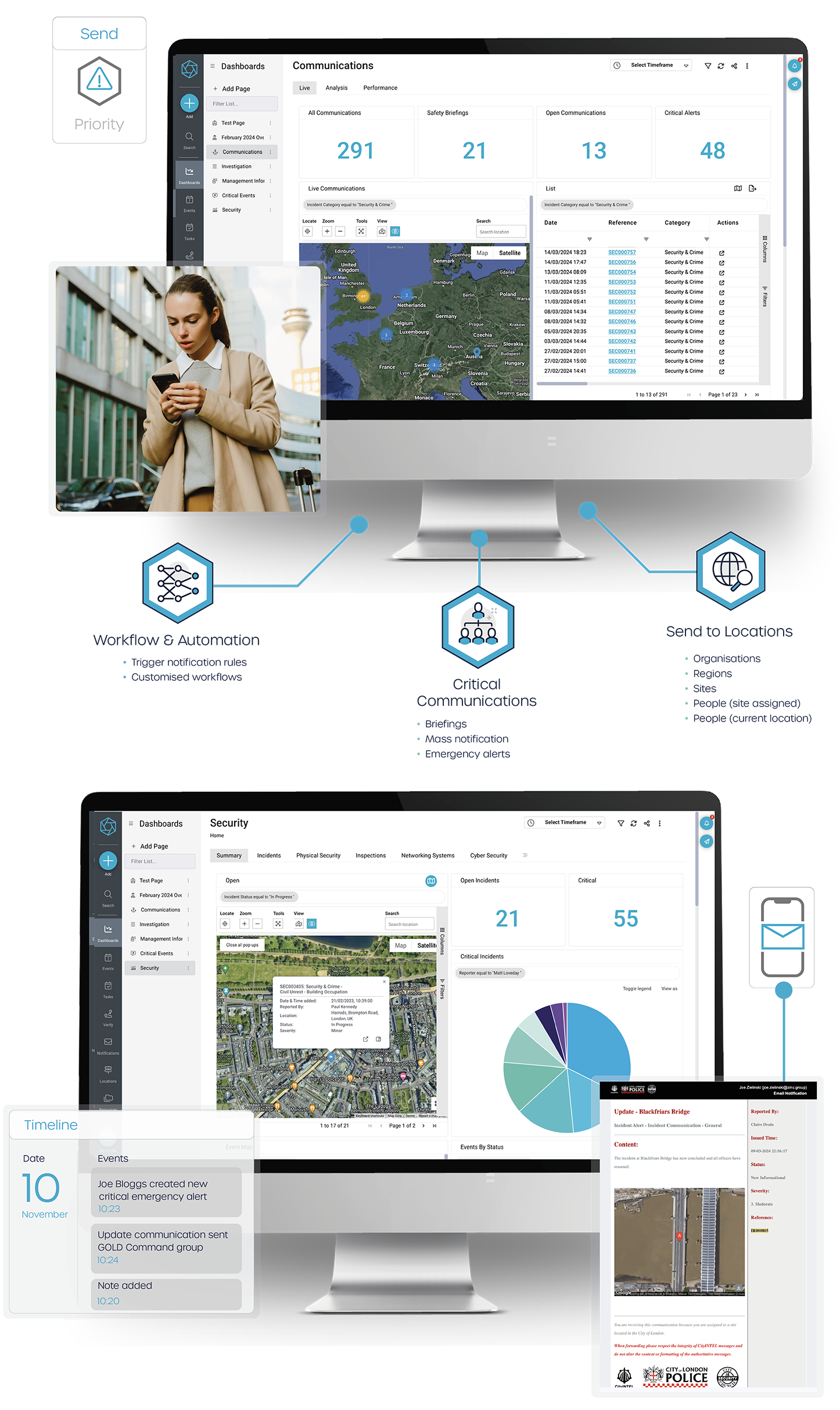
    Track every message, action, and response in one place. Ensure transparency and accountability from start to finish.
  • Situational awareness
    Turn data into real-time insights with custom views, live metrics, and actionable intelligence.
Zinc Systems

Our impact in numbers

40%Fewer missed escalations
Automated workflows ensure no one is left in the dark when it matters most.

80%Reduction in manual outreach
Eliminate repetitive admin by automating critical messages across all channels.

3xFaster stakeholder updates
Keep execs, partners, and responders informed in real time - without chasing.

35%Increase in staff engagement during incidents
Two-way messaging and mobile alerts keep everyone involved and responsive.

70%Boost in communication efficiency
Replace manual call trees and fragmented tools with automated, unified messaging.

£150KAnnual savings in crisis response costs
Faster communication minimises disruption, reputation damage, and risk.

Zinc Systems

Case studies

The Crown Estate
Media City, Salford UK
Paddington Square, London - Protected By Zinc
RopeMaker
22 Bishopsgate, London - Protected by Zinc
Culver Studios, California
Horizon22
The City of London
Mansion House, London
The City of London Police

The Crown Estate is a collection of lands and holdings in the United Kingdom belonging to the British monarch as a corporation sole, making it "the sovereign's public estate", which is neither government property nor part of the monarch's private estate.

Zinc's mass notification and emergency communication platform is used across the entire Crown Estate.

Read more

MediaCityUK is a 200-acre mixed-use property development on the banks of the Manchester Ship Canal and its principal tenants are media organisations such as ITV, BBC and also the Quayside MediaCityUK shopping centre.

Integrating Zinc into the MediaCity security team, is a significant step forward in safeguarding the vibrant hub where security is paramount in such dynamic environments.

Read more

A super-connected building situated above Paddington Station and is the only station in London with direct access to all mainland stations. The smart mixed-use building is home to major global companies offices, 40 shops and restaurants.

The team use Zinc to report, manage and analyse all critical events and activities, ensuring the highest levels of safety and security.

Read more

Ropemaker is one of London’s latest landmarks. This 25-story, 425,000 sq ft stone tower in the heart of the City of London and is one of the capital’s most sustainable buildings.

Zinc is currently being mobilised and will become a powerful command and control safety and security platform protecting its occupiers and assets.

Read more

22 Bishopsgate is the tallest skyscraper in the City of London standing at 278 m (912 ft) tall with 62 storeys. It's game-changing workspace occupies a prominent site in the financial district.

As Britain's smartest building, Zinc manages and controls all security, safety and risk events, as well as providing critical alerting to occupiers during fire evacuations.

Read more

Amazon Studios is an American television and film producer and distributor that is a subsidiary of Amazon. It specialises in developing television series and distributing and producing films in more than 240 countries and territories worldwide.

Zinc was awarded a contract to delivery command, control and communication for all incidents at premier film studios.

Read more

Horizon 22 is London's highest free viewing platform in all of Europe. The 254 metre above ground level viewing platform has 360-degrees views of London and its most iconic landmarks.

Zinc's platform runs the visitor weapons search confiscation form, lost & found, incident management and daily occurrence book (DOB).

Read more

The City Security Council (CSC) is recognised as a leading and authoritative voice of the security industry and one that represents the interests of thousands of security officers.

Implementing Zinc’s communication platform within the City of London Police control room enables real-time alerts – helping to strengthen public safety and resilience across the Square Mile.

Read more

Mansion House is the official residence of the Lord Mayor of London. It is a Grade I listed building and used for some of the most formal official government functions located across from the Bank of England and the Royal Exchange.

Zinc enhances safety/security operations and during critical incidents supports protecting high-value assets that require special attention.

Read more

The City of London Police is the territorial police force responsible for law enforcement within the City of London, England, including the Middle and Inner Temples.

Zinc operates a mass notification platform within the Joint Command and Control Room (JCCR) to send communications to the business community.

Read more
Zinc Systems

Why Zinc?

Join our growing community of world-leading customers and unlock rapid ROI with Zinc's innovative platform. Easily adaptable to your unique challenges, Zinc empowers your organisation to accelerate success and drive measurable impact.

Why Zinc? Loved by users

Loved by users
Custom-tailored services designed to meet your unique needs and preferences.

Why Zinc? World-class support

One unified platform
Expand at your own pace with an industry-leading and award winning modular platform.

Why Zinc? Reliable & secure

Reliable & secure
Custom-tailored services designed to meet your unique needs and preferences.

Why Zinc? Agile & Innovative

World-class support
Custom-tailored services designed to meet your unique needs and preferences.

Why Zinc? Join our community

Agile & innovative
Consistently delivering cutting-edge solutions evolving market and customer needs.

  • Ready to take control of your mass notifications?

  • BOOK DEMO

Mass Notification System Insights

Martyn’s Law readiness: an operating model for Security & Operations leaders

Martyn’s Law readiness: an operating model for Security & Operations leaders

In this article: Martyn’s Law will introduce a new baseline for protective security and public safety across the UK. For Security and Operations leaders responsible for publicly accessible environments, the challenge isn’t awareness – it’s delivery at scale, with consistent standards, clear accountability, and defensible evidence. This isn’t a document exercise. It’s an operational maturity […]

Beyond Compliance: How the CRE Sector Can Meet Martyn’s Law with Confidence

Beyond Compliance: How the CRE Sector Can Meet Martyn’s Law with Confidence

Executive summary Martyn’s Law introduces a new baseline for public protection across the UK, placing clear and ongoing obligations on organisations responsible for publicly accessible spaces. For the Commercial Real Estate (CRE) sector, this represents a structural change in how security risk, preparedness and governance must be managed and evidenced. Zinc provides a proven, operational […]

Key features to look for in an Incident Management System

Key features to look for in an Incident Management System

This article at a glance Learn what to look for in a modern Incident Management System, from real-time reporting and automated workflows to standardised procedures, compliance, and future-proofing under Martyn’s Law. Discover how the right system helps teams build safer, more resilient operations. Introduction In a world of increasing complexity and risk, the ability to […]

Top 20 Causes of Operational Disruption

Top 20 Causes of Operational Disruption

Resilience in the built environment is no longer a nice-to-have – it’s a necessity. From high-rise commercial towers to smart campuses, today’s buildings are complex, interconnected systems that must operate seamlessly to support safety, security, and business continuity. Yet even the most advanced environments are vulnerable to disruption. A sudden power failure, a fire system […]

Case Study – Unitrust Roll Out Zinc Connect

Case Study – Unitrust Roll Out Zinc Connect

We sat down with Jonathan Moore, Director of Operations at Unitrust to talk to him about the roll our of Zinc Connect model across 30+ of his locations. In this interview, Jon shares first-hand insights into the rising demand for higher standards in security management, the challenges facing providers, and how Zinc’s latest product, ‘Connect’, […]

Ensuring tenant safety in a shared commercial building

Ensuring tenant safety in a shared commercial building

In shared commercial buildings, tenant safety is a top priority. These spaces often house multiple businesses, each with unique operational needs and responsibilities. Ensuring safety and business continuity requires a cohesive approach that addresses potential risks and critical incidents. An Incident Management (IM) & Resilience platform is an invaluable tool in achieving this goal, fostering […]

Mastering Mass Notification Systems in CRE Emergencies: Strategies & Best Practices

Mastering Mass Notification Systems in CRE Emergencies: Strategies & Best Practices

What you will learn: This in-depth article examines how Commercial Real Estate (CRE) managers & building security teams can design, implement and refine mass notification systems to respond effectively to emergencies. We explore the fundamentals – such as multi-channel delivery, audience segmentation and real-time integration – before diving into practical strategies: maintaining accurate contact data, […]

Incident Management Solutions for Commercial Real Estate

Incident Management Solutions for Commercial Real Estate

Managing incidents in Commercial Real Estate (CRE) environments is no longer just a matter of responding when things go wrong — it’s a core part of maintaining operational resilience and tenant trust. From security breaches and maintenance failures to environmental hazards, CRE teams face a broad spectrum of risks. Having a robust incident management solution […]

How Cognitive Technology is Transforming the Modern Control Room

How Cognitive Technology is Transforming the Modern Control Room

The control room has changed. Once the domain of security-only operations, it’s now the nerve centre for entire organisations, coordinating everything from business continuity and building safety to ESG reporting and tenant experience. But while the role of the control room has expanded, the technology behind it hasn’t always kept pace. And it’s causing real […]

Even Smart Buildings have incidents

Even Smart Buildings have incidents

Smart buildings are reshaping the built environment. With integrated systems, real-time alerts, and automated controls, they promise safer, more efficient, and more responsive spaces. But here’s the truth: Even smart buildings have incidents! And the smarter the building, the higher the expectation for flawless operations and continuity. Why smart doesn’t mean incident-free According to a […]

London’s Smart Edge: Why Tech-Driven Resilience Matters

London’s Smart Edge: Why Tech-Driven Resilience Matters

In an era marked by geopolitical tensions and economic uncertainties, London stands uniquely poised to reaffirm its status as a neutral global financial hub. As highlighted in City A.M., the city’s enduring strengths – its adherence to the rule of law, political stability, and a world-class financial sector – position it as a safe harbour […]

Why resilience is now a business imperative – and how the right platform drives ROI

Why resilience is now a business imperative – and how the right platform drives ROI

Over the past few months, organisations across industries have felt the aftershocks of economic turbulence that few could have predicted. From rapid shifts in consumer behaviour to supply chain vulnerabilities, industrial action, cyber threats, and civil unrest – the challenges have been relentless. If the past few years have taught us anything, it’s that resilience […]

Explore our modules.

Incident Management Module

Navigate Crises, Maintain Continuity

Incident Management

Evidence & Investigation

Secure Evidence, Connect The Dots

Case Management

Daily Occurrence Book (DOB)

Stay Agile, Ensure Resilience

Daily Occurrence Book

Mass Notification

Inform Quickly, Protect People

Mass
Notification

Patrol Management

Secure Operations, Ensure Compliance

Patrol
Management

Audits, Checks & Inspections

Get compliance right, every time

Audits, Checks & Inspections

Tasks & Procedures

Get things done, the right way

Tasks &
Procedures

Incident Management Module

Promote Wellness, Prevent Hazards

Health & Safety Management

Data Reporting & Analytics

Smarter Insights, Stronger Outcomes

Data Analysis & Reporting

Threat Intelligence

Seamless, Actionable Intelligence

Threat
Intelligence

Administration Panel

Configure Fast, Adapt Instantly

Administration
Portal

Icon - Integrations-MicroApps

Connect Systems, Scale Smarter

Integrations

Resources: Frequently Asked Questions

Mass notification refers to the ability to send immediate alerts or messages to a large group of people simultaneously, across multiple communication channels such as email, SMS, social platforms, and other integrated systems.

It plays a crucial role in emergency response, crisis management, and information dissemination, enabling organisations, institutions, and communities to quickly relay vital information to ensure safety, coordinate actions, and minimise confusion during critical situations.

A mass notification platform is essential for effectively managing responses to natural disasters, security threats, health emergencies, and other urgent events, ensuring that all affected individuals receive timely and accurate information to take appropriate actions.

Mass notification systems can significantly benefit your organisation in several ways:

  1. Enhanced Safety and Security: Quickly communicate vital information during emergencies, such as natural disasters, security threats, or health crises, helping to protect employees, clients, and assets.
  2. Improved Communication: Ensure that important messages reach all relevant parties promptly and efficiently, regardless of their location, enhancing the flow of information within the organisation.
  3. Increased Efficiency: Streamline the process of sending out alerts, saving time and resources while reducing the risk of communication errors.
  4. Compliance with Regulations: Help meet legal and regulatory requirements for safety and emergency preparedness in certain industries or regions.
  5. Crisis Management and Response Coordination: Facilitate coordinated response efforts during emergencies by enabling swift communication among response teams, management, and all impacted individuals.
  6. Building Trust: Demonstrate commitment to safety and transparency by keeping stakeholders informed, thereby building trust and confidence among employees, customers, and partners.
  7. Operational Continuity: Mitigate disruptions to operations by quickly addressing and managing situations that could affect your organisation's functioning.
  8. Data-Driven Insights: Some systems offer analytics and reporting tools, providing insights into communication effectiveness, response times, and engagement, allowing for continuous improvement in crisis communication strategies.

Incorporating a mass notification system can significantly bolster your organisation's preparedness and resilience, ensuring that you are better equipped to handle unexpected events and maintain critical operations under various circumstances.

A manual mass notification tool is typically used in situations where it is essential to communicate urgent or important information quickly to a large group of people. These tools are invaluable for ensuring that everyone receives the same message simultaneously, enhancing the coordination and management of the situation.
While automated systems and processes are also prevalent, manual systems provide the flexibility to tailor the message specifically to the situation at hand, potentially incorporating real-time updates and personalised instructions.
Here are some scenarios when a manual mass notification tool might be used:
  1. Emergency Situations: In the event of emergencies like natural disasters (earthquakes, floods, hurricanes), fires, or active shooter scenarios, mass notification systems can quickly alert individuals in the affected areas, providing instructions on how to stay safe.
  2. Public Safety Alerts: For broader public safety concerns, such as severe weather warnings, health pandemics, or chemical spills, these tools can disseminate critical information to help people take necessary precautions or evacuate if needed.
  3. Organisational Communication: Companies and organisations use mass notification tools for urgent internal communication, such as informing employees about office closures, system outages, or important reminders. This ensures that all employees are informed simultaneously, reducing confusion and misinformation.
  4. Educational Institutions: Schools, colleges, and universities utilise these systems to alert students and staff about campus emergencies, closures due to inclement weather, or other urgent notifications affecting campus life.
  5. Event Management: For large events, organisers may use mass notification tools to communicate with attendees about schedule changes, venue updates, or emergencies, ensuring everyone receives consistent information quickly.
  6. Government Alerts: Local, state, or federal government agencies may deploy these systems to alert citizens about various situations, such as evacuation orders, shelter-in-place commands, or other public service announcements.
  7. Business Continuity and Disaster Recovery: In the event of unexpected disruptions, like IT system failures, power outages, or supply chain issues, businesses can use these tools to communicate with employees, suppliers, and customers about the situation and expected recovery actions.

Mass notification systems can be highly beneficial for various types of communications within an organization. Here are top examples of when and how these systems are used:

  1. Emergency Alerts: Communicating immediate threats or emergencies, such as natural disasters (earthquakes, floods), fires, or active shooter situations, ensuring swift dissemination of critical safety instructions.
  2. Health and Safety Updates: Informing about health emergencies, pandemic updates, or safety measures that need to be taken, like in the case of COVID-19 or flu outbreaks.
  3. Operational Disruptions: Notifying about unexpected disruptions in operations, such as power outages, IT system failures, or critical infrastructure issues, to minimise impact and coordinate response efforts.
  4. Evacuation Orders: Issuing evacuation orders in case of imminent danger to life or property, providing clear instructions on evacuation routes and safety zones.
  5. Weather Warnings: Alerting about severe weather conditions that could affect operations or safety, like hurricanes, tornadoes, or severe snowstorms.
  6. Security Threats: Informing about security threats or breaches, ensuring employees are aware and can take necessary precautions or follow protocols.
  7. Maintenance Notifications: Announcing planned maintenance activities that might affect normal operations or access to facilities, helping to minimise inconvenience.
  8. Critical Deadlines or Reminders: Sending reminders for critical deadlines, such as compliance filings, project milestones, or mandatory training sessions, ensuring nothing crucial is overlooked.
  9. Organisational Changes: Communicating significant organisational changes, such as leadership transitions, restructuring, or policy updates, to keep everyone informed and aligned.
  10. Community Engagement and Events: Promoting community engagement activities or events, encouraging participation and fostering a sense of community within the organisation.

Mass notification systems facilitate efficient and reliable communication for a wide range of needs, ensuring that all members of an organisation are promptly informed, prepared, and able to respond appropriately to various situations.

Using multiple communication channels for sending mass notifications is crucial for several reasons, significantly enhancing the effectiveness, reach, and reliability of the messages being sent. Here are key reasons why employing a multi-channel approach is beneficial:

1. Increased Reach and Accessibility

Different people have different preferences and accessibilities when it comes to communication channels. While some may frequently check their emails, others might prefer text messages, social media, or voice calls. Using multiple channels ensures that you can reach more of your target audience, regardless of their preferred mode of communication or accessibility issues.

2. Redundancy and Reliability

Reliance on a single communication channel can be risky, especially if that channel experiences an outage or disruption (e.g., email server down, cellular network overloaded). By distributing the same message across various platforms, you create a redundancy that ensures the message gets through to the recipients even if one or more channels fail.

3. Improved Engagement Rates

Different channels have different engagement rates. Text messages might have a higher open and read rate compared to emails, but emails can convey more detailed information. Using a combination of channels allows you to leverage the strengths of each, leading to better overall engagement with your message.

4. Preferences

People have varied preferences for how they receive information, and these preferences can change based on the context or urgency of the message. A multi-channel approach allows recipients to receive messages in the format they are most likely to notice and prefer, increasing the effectiveness of the communication.

5. Ensuring Timeliness

In urgent situations, timeliness is critical. By broadcasting messages across multiple channels simultaneously, you maximise the chance that the message is seen promptly, which is crucial in emergencies or time-sensitive situations.

6. Legal and Compliance Reasons

In certain cases, regulations or laws might require that information be disseminated through specific channels to ensure it reaches all relevant parties. Using multiple channels can help ensure compliance with these regulations.

7. Coverage Across Different Situations and Environments

People may not have access to all communication channels at all times due to various reasons such as being in a meeting, driving, or in an area with poor cellular reception. A multi-channel approach increases the likelihood that the message is received regardless of the recipient's situation.

In summary, employing a multi-channel strategy for mass notifications is essential for ensuring that critical messages are effectively communicated to a broad audience. This approach enhances the reach, reliability, and overall effectiveness of communications, especially in emergency or urgent situations.

Sending geo-mapped notifications during a mass notification effort means targeting recipients based on their geographic location. This approach is highly effective and beneficial for several reasons, particularly in situations where location-specific information is crucial.

Here's why targeting geo-mapped recipients is a strategic choice:

1. Relevance and Personalisation

Geo-mapped notifications ensure that the information is highly relevant to the recipients based on their current or registered location. This increases the likelihood that the message will be perceived as pertinent and timely, leading to higher engagement rates. For example, weather alerts or emergency notifications about local incidents are more relevant to those in the affected areas.

2. Resource Optimisation

By targeting messages to specific geographic areas, organisations can optimise the use of their resources. Instead of broadcasting a message to a wide audience, many of whom it may not concern, targeting allows for a more efficient use of communication channels and reduces unnecessary alarm or communication fatigue among recipients outside the relevant area.

3. Effective Crisis Management

During emergencies, geo-mapped notifications can be crucial for effectively managing the crisis. They allow authorities and organisations to send targeted warnings, evacuation orders, or instructions to those in the affected area, enhancing the safety and security of the populace.

4. Enhanced Compliance

In certain jurisdictions, legal or regulatory requirements may necessitate informing individuals in specific locations about particular events or conditions. Geo-mapped notifications ensure compliance with these regulations by accurately targeting the required geographic areas.

5. Reduced Information Overload

People are bombarded with vast amounts of information daily. By ensuring that messages are location-specific, organisations reduce the risk of information overload among recipients. This helps to maintain the effectiveness of communication channels over time, as recipients are less likely to ignore or opt out of receiving notifications.

6. Improved Trust and Perception

When people receive notifications that are directly relevant to their safety and wellbeing, their trust in the issuing organisation or authority can increase. This relevance is often achieved through geo-targeting, which demonstrates a thoughtful and organised approach to communication, thereby improving public perception and trust.

7. Faster Response Times

For recipients in the targeted area, receiving timely and relevant information can lead to faster response times to emergencies, instructions, or calls to action. This is particularly important in situations where seconds can make a significant difference, such as evacuating an area before a natural disaster strikes.

8. Efficient Evacuation and Resource Allocation

In evacuation scenarios, geo-mapped notifications can help manage traffic flow and prevent congestion by providing area-specific instructions. This allows for a smoother evacuation process and enables emergency services to allocate resources more efficiently, focusing on areas with the highest need.

Geo-mapped notifications represent a strategic approach to mass communication, enhancing the relevance, efficiency, and effectiveness of messages, particularly in critical situations where timely and location-specific information can save lives and resources.

Yes, you can customise templates for various types of communications.

These customisable templates allow organisations to prepare messages in advance for different scenarios, such as emergencies, maintenance updates, safety drills, or general announcements.

By having pre-defined templates, you can ensure that communications are consistent, clear, and can be dispatched quickly, reducing the time needed to draft messages during critical situations.

Customisation options include the ability to modify the text, incorporate dynamic fields (like names, locations, dates), and even adjust the design or format to align with the organisation's branding or communication standards.

This feature streamlines the process of sending out notifications, ensuring that all recipients receive timely and accurate information tailored to the specific incident or announcement.

Mass notification systems work across a global estate by leveraging a centralised platform capable of reaching all intended recipients, regardless of their geographical location. These systems are designed to ensure consistent, rapid, and reliable delivery of messages to individuals or groups within an organisation's global network. Here's how they typically operate:

  1. Centralised control: A single platform allows administrators to craft and send messages, ensuring uniformity and consistency across the global estate. This central control can adapt messages to local languages and regulations.
  2. Multiple delivery channels: To ensure message delivery despite local network conditions or personal preferences, mass notification systems use various channels such as SMS, email, mobile app notifications, and social platforms.
  3. Geo-targeting and localisation: Advanced systems can target messages based on the geographic location of recipients, allowing for localised alerts specific to certain regions or threats relevant to particular areas. This is particularly useful for weather-related alerts or region-specific emergencies.
  4. Scalability: These systems are scalable to accommodate the vast number of recipients involved in a global operation, ensuring that messages are delivered quickly and efficiently to thousands or even millions of people.
  5. Compliance and data security: Ensures compliance with international data protection regulations and maintains high standards of data security to protect sensitive information.
  6. Real-time analytics: Offers real-time tracking of message delivery and engagement and dashboards based on the notifications that have been sent.

Implementing a mass notification system across a global estate enables organisations to manage communications seamlessly during critical incidents, ensuring that all members of the organisation, no matter where they are located, receive timely and pertinent information that can aid in their safety and the continuity of operations.

Our mass notification platform in a single location or building function by leveraging integrated communication platforms to instantly disseminate information to all relevant individuals within that location. Here's how it works:

  1. Centralised control: A centralised system allows administrators to quickly compose and send messages from a single point of control, ensuring consistency and accuracy of the information.
  2. Multiple channels: Messages are distributed through various channels such as email, text messages (SMS), and mobile app notifications. Integration capability could allow for loudspeakers (PA systems), digital signage to also be utilised. This multi-channel approach ensures that the message reaches everyone, catering to different communication preferences and situations.
  3. Segmentation and Targeting: The system can be set up to target specific groups within the building based on their location/floor, role, or other criteria. For instance, a message about a maintenance issue in one wing can be sent only to the occupants of that area, minimising disruption to others.
  4. Integration with building systems: MNS can be integrated with other building management systems such as fire alarms or access controls. In an emergency, the system can automatically trigger lockdown procedures or direct occupants to the nearest exits, guided by voice messages or illuminated signs.
  5. Drills and training: Regularly scheduled drills can be conducted using the MNS, helping to familiarise occupants with procedures and ensuring the system functions as expected.
  6. Compliance and auditing: The system keeps a record of all messages sent and responses received, which is crucial for post-incident reviews and compliance with safety regulations.

In a single location/building, the effectiveness of a mass notification system ensures communication reach everyone quickly, clearly convey the necessary action, and adapt to the specifics of the environment and its occupants. This comprehensive approach enhances safety, security, and communication efficiency, particularly in emergencies or critical situations.

You can either manually upload your contacts using an import tool or integrate your existing contacts, along with utilising Single Sign-On (SSO) capabilities.

Contact Integration:

This feature allows organisations to import and synchronise contact information from their existing databases, HR systems, or customer relationship management (CRM) tools directly into the mass notification platform. It ensures that the contact list is up-to-date, minimizing the risk of missing out on notifying anyone due to outdated information. Contact integration can often be automated, providing continuous synchronization and segmenting of contacts based on various criteria like department, location, or role, which is crucial for targeting specific groups with relevant messages.

SSO Integration:

Single Sign-On integration enables users to access the mass notification platform using their existing organisational login credentials, simplifying the login process and enhancing security. SSO reduces the need for multiple passwords and login procedures, making it easier for administrators and users to access the system quickly, especially in urgent situations. It also helps in maintaining higher security standards, as it allows the organization's IT policies, like password complexity and rotation, to be applied to the mass notification system access.

Integrating contacts and SSO into a mass notification platform streamlines the process of managing the system, improves ease of use, and ensures that the platform is always ready to send out notifications as efficiently and securely as possible.

Manual upload:

Alongside automatic synchronisation and integration features, the manual import process involves uploading a a CSV (Comma Separated Values) file that contains the contact details of individuals who need to be notified. This method is particularly useful in scenarios where:

  1. Integration isn’t available or practical: Not all systems or databases might be compatible with automatic synchronisation, or the organisation may not use a centralised HR or CRM system from which to pull contact information.
  2. Initial Setup: During the initial setup of the mass notification system, manual import can be a quick way to populate the platform with the necessary contacts before any integrations are configured or if the organisation prefers a more controlled, reviewable process for adding contacts.
  3. Updating Contacts in Bulk: When there are significant changes to be made to the contact list, such as after a reorganisation or during annual updates, importing a new file can be more efficient than updating each contact individually.
  4. Special Circumstances: For special events or specific scenarios that require notifying a unique group of people not usually in the system, manually importing a temporary list can be very practical.

The process for manual import involves preparing the file according to a templated format. Once prepared, the file is uploaded through the platform's admin console, where it is processed and the contacts are added to the system’s database.

You are In safe hands

  • ISO 27001 & Cyber Essentials
  • G-Cloud Government Framework Approved
  • Crown Commercial Service - CCS
  • Google Partner
  • AWS - Amazon Web Services Secure Hosting Infrastructure
  • SIA - Security Industry Authority
  • OWASP - The Open Worldwide Application Security Project
Request

Case Study